> For the complete documentation index, see [llms.txt](https://docs.slyzz.xyz/llms.txt). Markdown versions of documentation pages are available by appending `.md` to page URLs; this page is available as [Markdown](https://docs.slyzz.xyz/fivem-triggerbot/presentation-of-the-triggerbot.md).
# Presentation of the Triggerbot
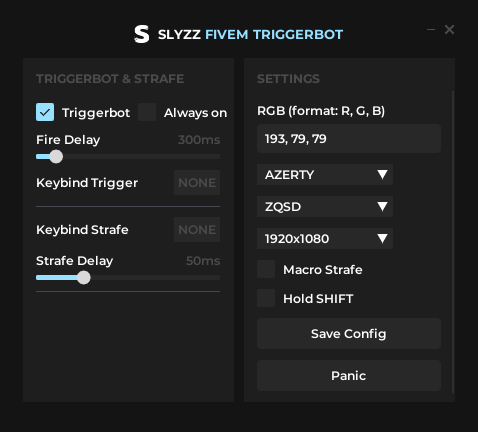
**Triggerbot Button:** Enable/disable the triggerbot.\
**Fire Delay:** Delay between each shot.\
**Keybind Trigger:** When you hold the keybind to enable the triggerbot.\
\
**Keybind Strafe:** When you hold the keybind to enable macro strafe.\
**Strafe Delay:** The delay between each key press; the lower the value, the faster the strafe movement.\
\
**RGB Colors:** The RGB color is the color of your red dot when you aim at a person, if you don't use reshade no need to modify it. If using reshade you need to modify this value, the tutorial for changing this value is here.\
**AZERTY/QWERTY:** If your keyboard is AZERTY, then choose AZERTY. If it is in QWERTY then choose QWERTY.\
**ZQSD/ZQSD:** this is the meaning of the macro strafe, choose according to your preference.\
**Resolution:** Choose the resolution you have in your game.\
**Hold Shift:** This means that it will press shift continuously when you activate the strafe macro.\
If you disable it, it won't press SHIFT when you use the strafe macro.\
**Panic Button:** If a moderator checks your PC, press this button, this will clear as many traces as possible.